SEO Tips for Changing File Names - Random File Names / Supports Multiple Format Settings
Table of Contents
To avoid highly similar content, increase differentiation, and reduce duplicate content, setting random/sequential/custom keyword file names can have a positive effect on SEO.
Renaming purpose
- By differentiating ourselves and incorporating our own elements, we can achieve better SEO results.
Handling method
Random filename
- Random filenames disrupt the original filename naming rules, reducing discrepancies.
Sequential filenames
- Compared to random filenames, the sorting is more orderly and regular, achieving the same level of differentiation.
File name with keywords
- Adding keywords to a filename indicates that the URL contains those keywords. Search engines give higher weight to URLs containing keywords than those without.
How to set it up
Download Xiaofeitu (Flagship Version), software menu bar:
Configuration options->Rename file
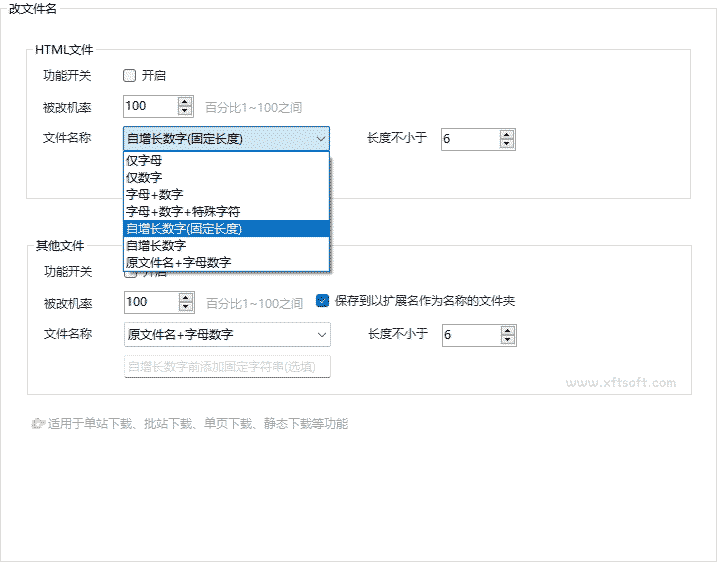
Configure by file category
HTML fileandcss/js/img files, etc.Two categories, each supporting separate settings.
Define file name change
- The dropdown menus for both settings are the same and both support [the same function].
Letters only、Numbers Only、Letters + Numbers、Letters + Numbers + Special Characters、Self-increasing number (fixed length)、Self-growing numbers、Original filename + numberThe "auto-incrementing number" and "original filename + number" fields support inputting custom prefix keywords.
File name length
- Sets the length of a specified filename; the default is 6 characters.
Previous article:The Internet Archive's Time Machine