
[Baidu API] Obtaining and configuring the Baidu Translate API
This article explains how to enable the Baidu Translate API and...
Xiaofeitu (a website translation service)Configure the Baidu Translate API.
Activation steps
1. Register a Baidu account
- Register a Baidu Translate account here:https://api.fanyi.baidu.com/
- Baidu official documentation:https://api.fanyi.baidu.com/doc/12
2. Enable "General Translation"
- Activation reference document:https://api.fanyi.baidu.com/doc/13
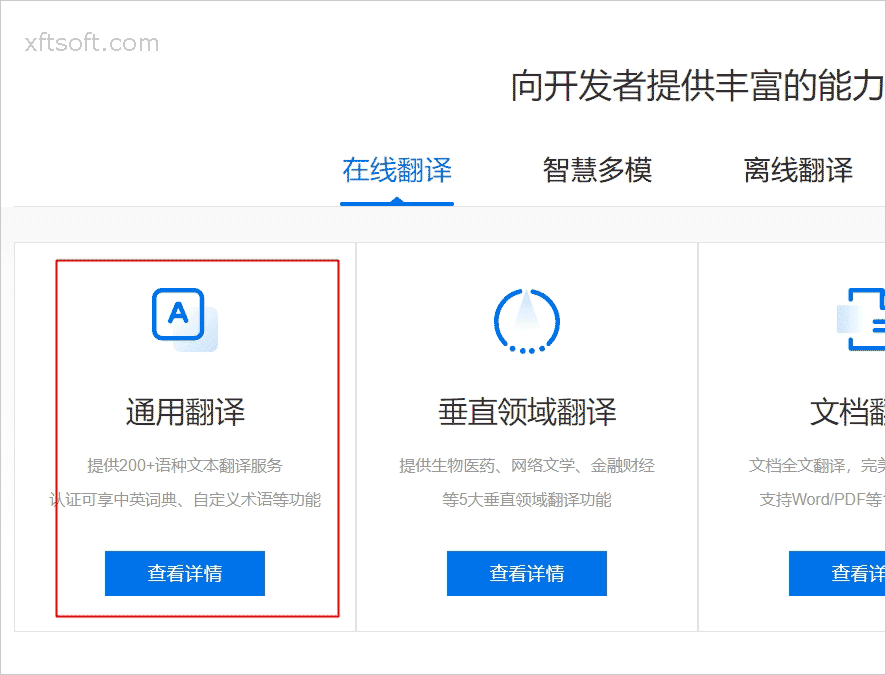
1) Click to view details
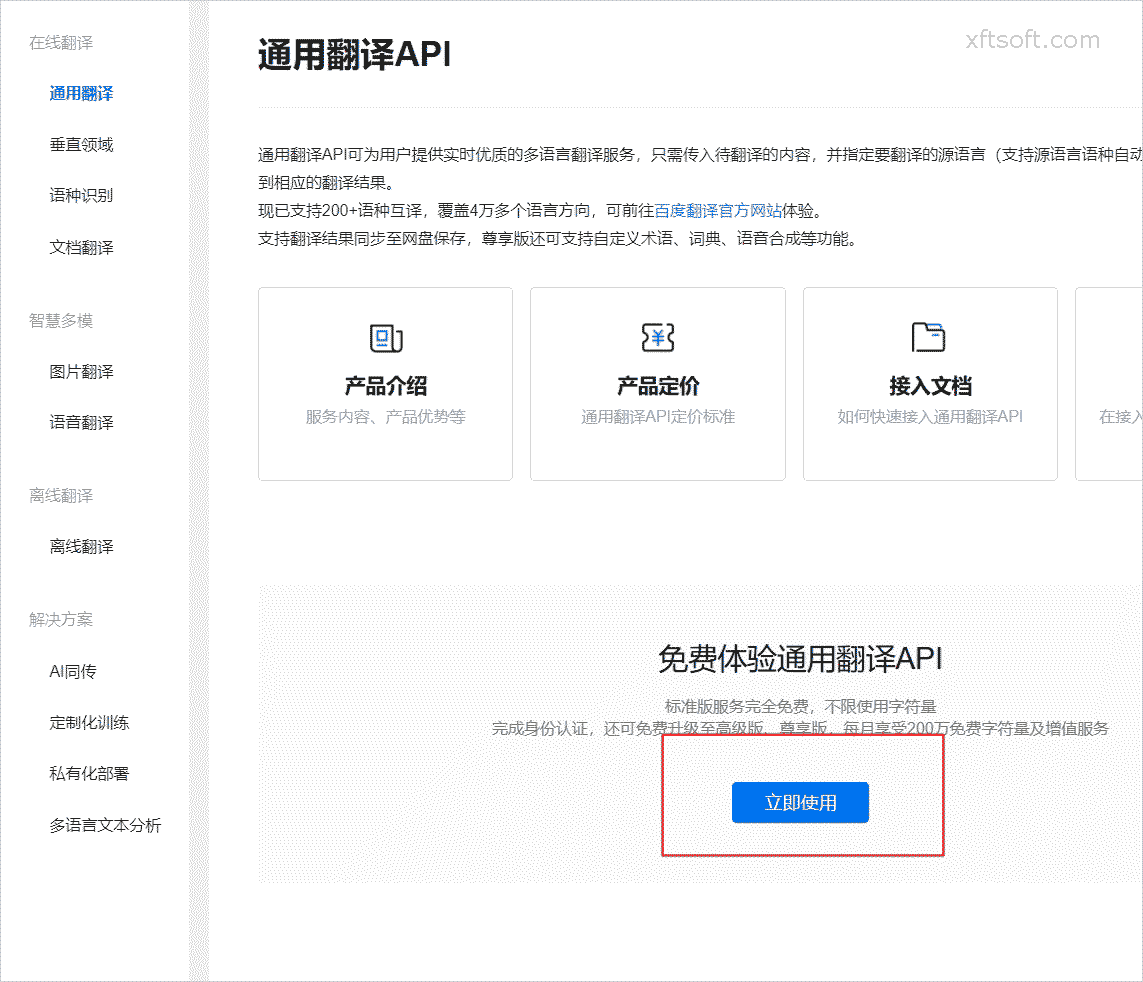
2) Click "Use Now"
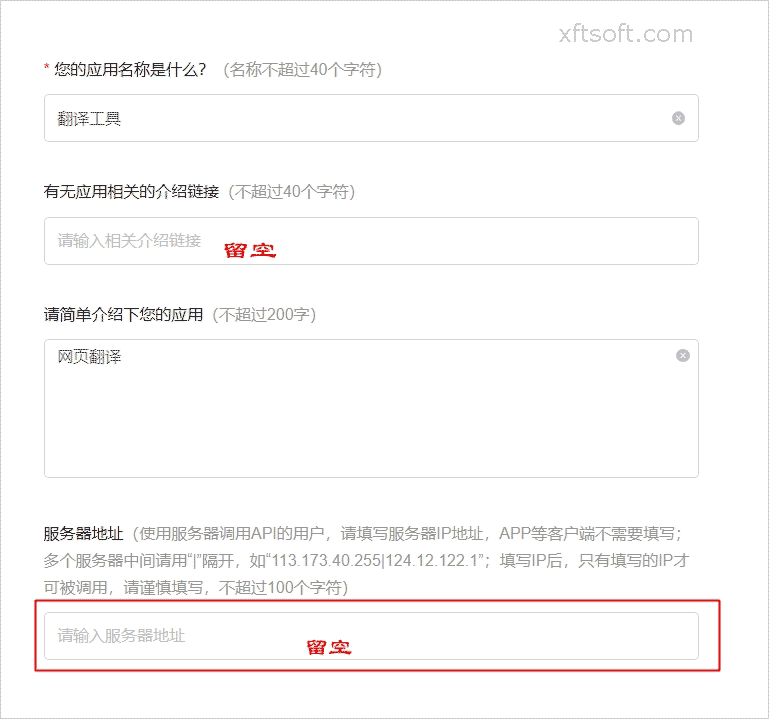
3) Fill in the information to apply for activation
3. Copy APPID and key
copy
APPIDandKeyaddress: https://api.fanyi.baidu.com/api/trans/product/desktop
Will
APPIDandKeyCopy to software configuration items. Activated service version:Standard Edition (Personal)、Premium Version (Individual)、Premium Edition (Enterprise)This configuration must be consistent with Baidu Translate.
4. Test and verify the translation
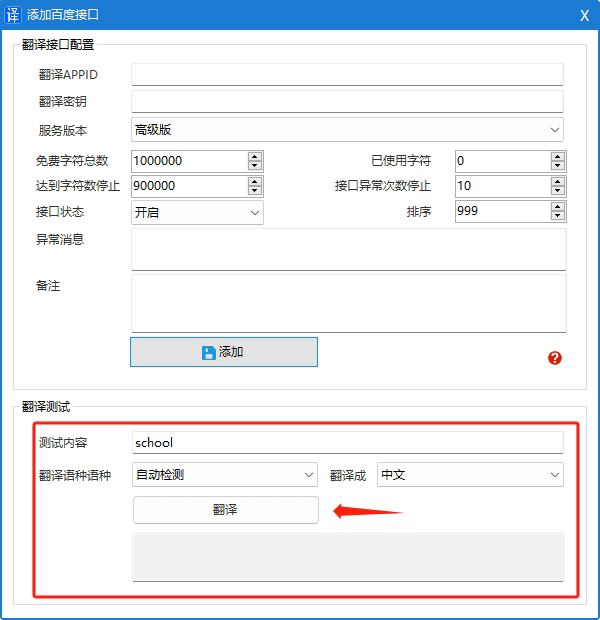
Configuration Interface
Download software
- If you haven't downloaded it yet
Xiaofeitu (a website translation service)Please download the software first:/product/download/translation.zip
Interface configuration
- Open the software and click on the menu bar.
Configuration Interface。
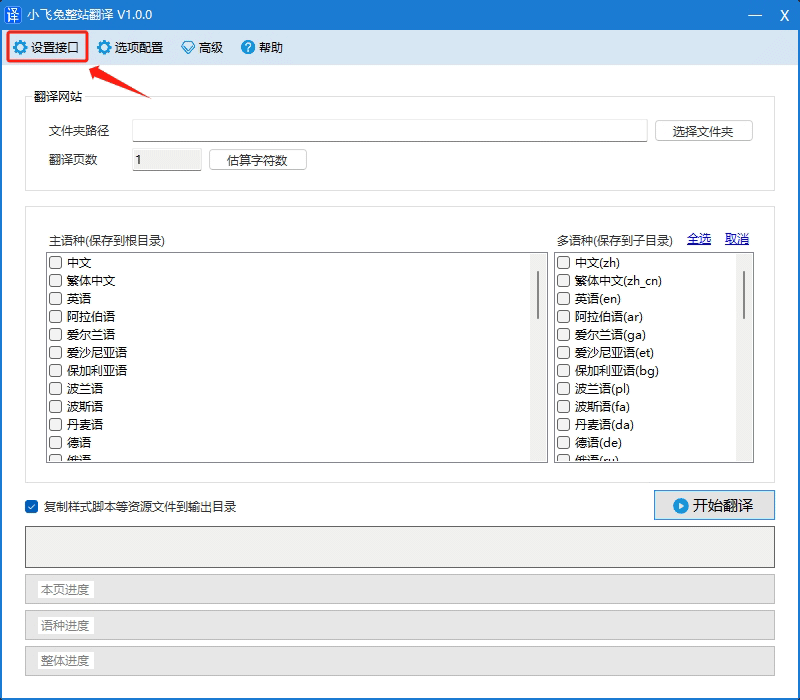
- In the opened window, click
Add Baidu。

- In the opened window, enter the following:
Translate APPID、Translation KeyandService Version。
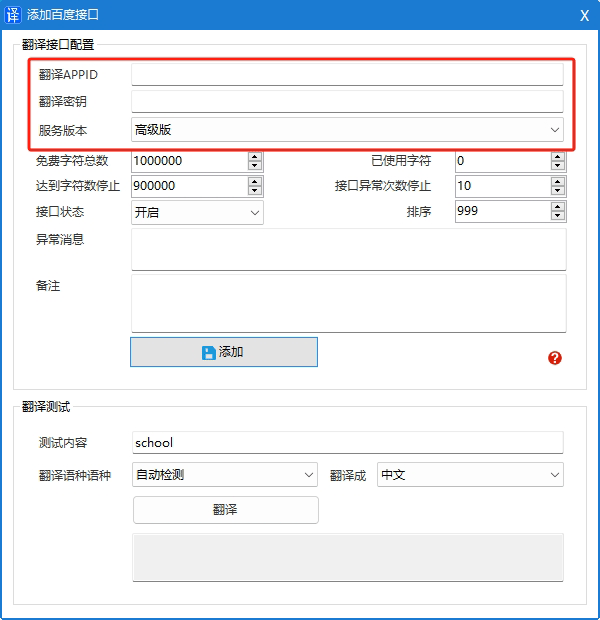
- Click the button
Add to。
Interface fees
free
- 50,000 characters per month
Paid
Standard EditionThe first 50,000 characters per month are free, with no limit on the number of characters used (QPS=1, i.e., one request per second to the interface), 49 yuan/million characters;Premium versionThe first 1 million characters per month are free; after that, only the excess will be charged (QPS=10, which means 10 requests per second), at 49 yuan per million characters.Premium EditionThe first 2 million characters per month are free; after that, only the excess will be charged (QPS=100, which means 100 requests per second), at 49 yuan per million characters.
For detailed pricing information, please refer to the official website documentation.https://fanyi-api.baidu.com/product/112
Precautions
- Do not change your IP address after using Baidu Translate on the same day, otherwise the IP address will be blocked and will not be unblocked until the next day. The error code is 58003.
- Applying for the premium version (enterprise) typically takes 1-2 days for approval.
Error code list
Official website:https://api.fanyi.baidu.com/doc/26
| Error code | meaning | Solution |
|---|---|---|
| 0 | success | |
| 52001 | Request timed out | Please try again. |
| 52002 | Server system error | Please try again. |
| 52003 | Unauthorized users | Please check if the appid is correct or if the service is enabled. |
| 52010 | Insufficient open device license capacity | Contact the administrator to increase capacity |
| 54000 | Required parameters are empty or fixed parameters are incorrect. | Check if parameters were transmitted incorrectly. |
| 54001 | Signature error | Please check your signature generation method. |
| 54003 | Access frequency limited | Please reduce your call frequency. |
| 54004 | Insufficient account balance | Please go to the management control platform to top up your account. |
| 54005 | Frequent long query requests | Please reduce the frequency of sending long queries and try again in 3 seconds. |
| 58000 | Invalid client IP | To check if the IP address entered in your personal profile is correct, you can go to the management control platform to modify it. IP restrictions apply; the IP address can be left blank. |
| 58001 | The translation language direction is not supported. | Check if the target language is in the language list. |
| 58003 | Due to the use of improper means to collect user APPIDs and keys, the resulting theft of character data has become increasingly rampant. The system's risk control has added IP verification rules. If the same IP uses multiple APPIDs to send translation requests on the same day, that IP will be banned from requesting permissions for that day and unbanned the following day. However, due to the variability of IPs and the complexity of application scenarios, it is inevitable that some legitimate users will be mistakenly penalized. | Apply for lifting the lockdown or wait for the next day to lift the lockdown. |
| 69001 | The uploaded image data is incorrect. | Check if there are any problems with the image. |
| 69002 | Image recognition timed out | Please try again. |
| 69003 | Content recognition failed | Try again after checking if the image contains content. |
| 69004 | The identified content is empty. | Try again after checking if the image contains content. |
| 69005 | Image size exceeds the limit (over 4MB) | Please upload an image that meets the image size requirements. |
| 69006 | Image dimensions do not meet standards (shortest side at least 30px, longest side maximum 4096px). | Please upload an image that meets the image size requirements. |
| 69007 | Image formats not supported (png/jpg) | Please upload images in PNG or JPEG format. |
| 69008 | Device number is empty | Check cuid parameters |
| 69012 | Text alignment parameters abnormal | Please check the parameter `paste`. Enumeration examples: 0 - Turn off text blending; 1 - Return to full image blending; 2 - Return to block blending. |
Previous article:[Google API] Obtaining and configuring the Google Translate API