
How can I change my email address and reset my password?
Change email
Log in to Member Center
- How to log in? (See reference:)./user_login.html
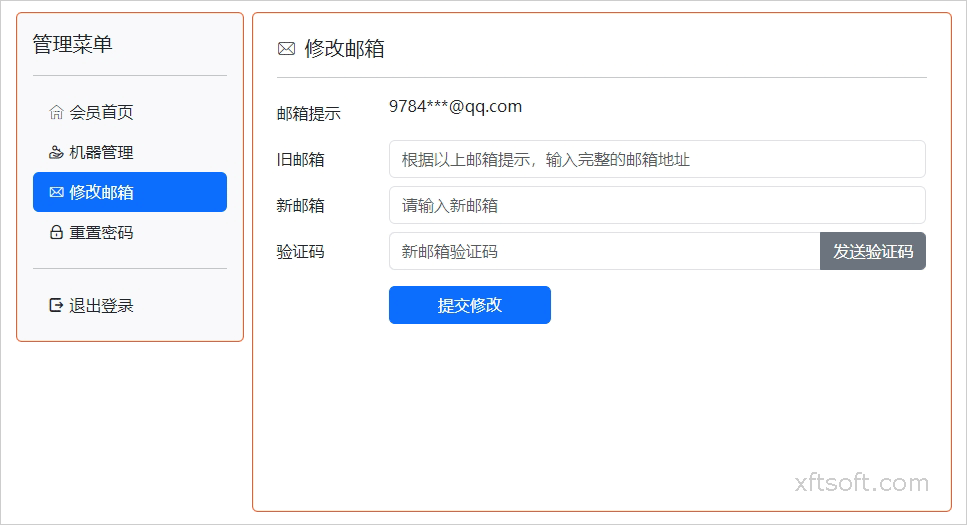
Change email
- After logging into the member center, click on the menu in the left column.
Change email。 - Fill out the form:
Old email addressPlease complete your email address as instructed.New emailChange to a new email address;Verification codeAfter entering your new email address, click [here].Send verification codeThe verification code will be sent to your new email address. Copy the verification code and fill it in.
- Click
Submit changesReplacement complete.
Reset password
Log in to Member Center
- Refer to the instructions for changing your email address when logging into the member center.
Reset password
- After logging into the member center, click on the menu in the left column.
Reset password。 - Fill out the form:
Your email addressPlease complete your email address as instructed.Verification codeAfter completing the email address, click...Send verification codeThe verification code will be sent to your email address. Copy the verification code and fill it in.
- Click
Reset passwordModifications complete.
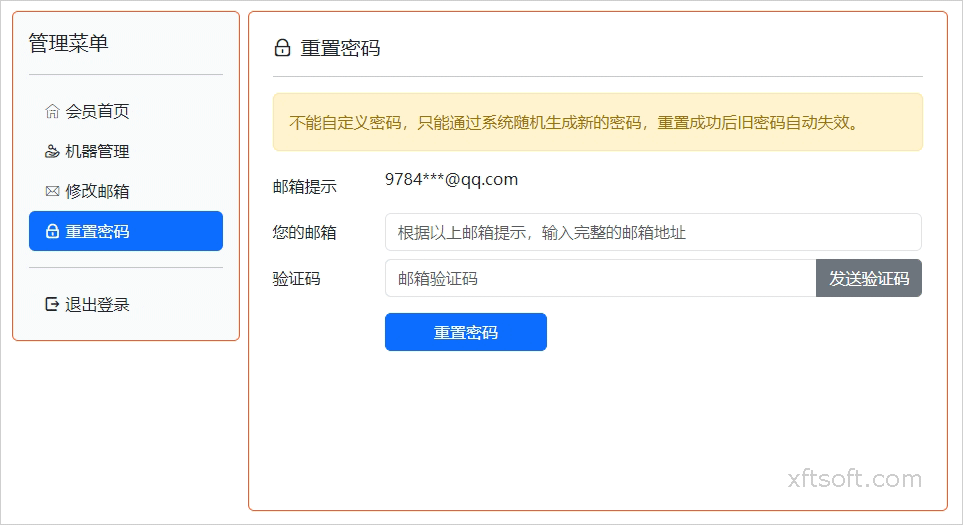
The password cannot be customized; only the system can reset a new password.
Previous article:What does "replacing a device" mean, and how is it done?