
What does "replacing a device" mean, and how is it done?
Table of Contents
Transfer the professional version of the software from your current computer to another computer. Once the computer transfer is successful, the registration code on the original computer will automatically become invalid.
Replacement conditions
- The purchased package includes a free device replacement, and at least one replacement is provided.
Log in to Member Center
- How to log in? (See reference:)./user_login.html
Replacement steps
- Log in to the member center.
- Click the menu on the left.
Machine Management。
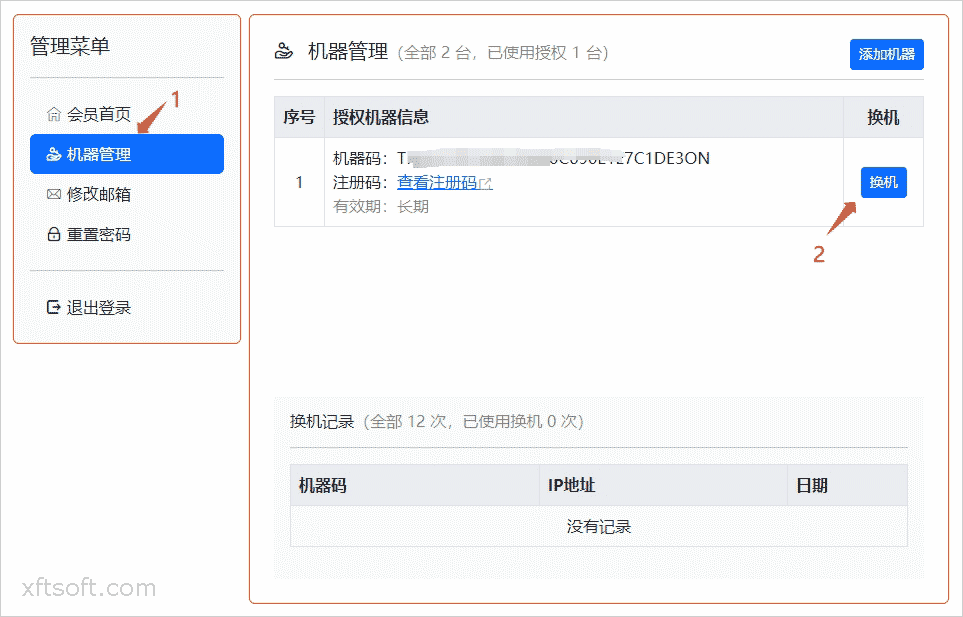
- Click on the list
ReplacementButton. - On the device replacement page, enter the new device code and click OK.
- After successful submission, the system will return a new registration code. Copy the registration code to register the software.
Software registration reference:./buy.html