HomeRelated InformationA SmartScreen security warning pops up when opening an EXE file.
A SmartScreen security warning pops up when opening an EXE file.
Table of Contents

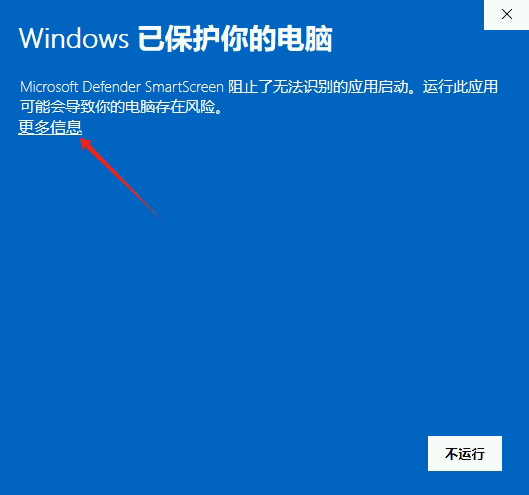
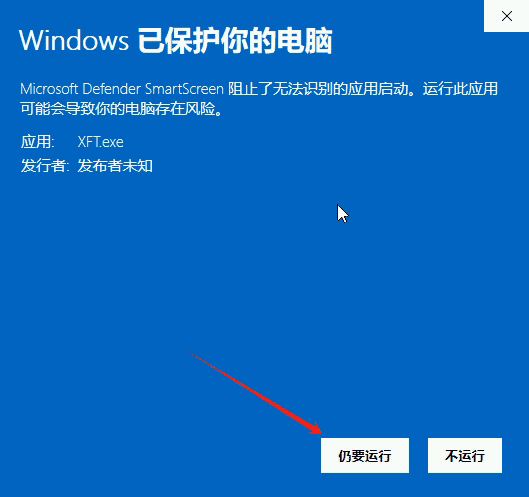
When opening an EXE file, a SmartScreen security warning pops up: Windows has protected your PC. Microsoft Defender Smartscreen has blocked an unrecognized application from launching. Running this application may put your PC at risk.

Solution

  • Click "More Information"

  • Click "Run Anyway"

Software Applications: Front-end template download; development and design; SEO optimization; offline web browsing. Note: This software is not a hacking program and cannot download backend data!
Disclaimer: This service is for personal study, research, or enjoyment purposes only, and is for non-commercial, non-profit use. Users must comply with copyright laws and related regulations and must not infringe upon the legitimate rights and interests of this website and related rights holders. Any risks arising from the use of this tool are the sole responsibility of the user and are not the responsibility of the software itself.
Copyright © 2019-2026 Xiaofeitu Software. All Rights Reserved. Guangdong ICP Registration No. 19111427-2
Tutorial User Manual Website Special